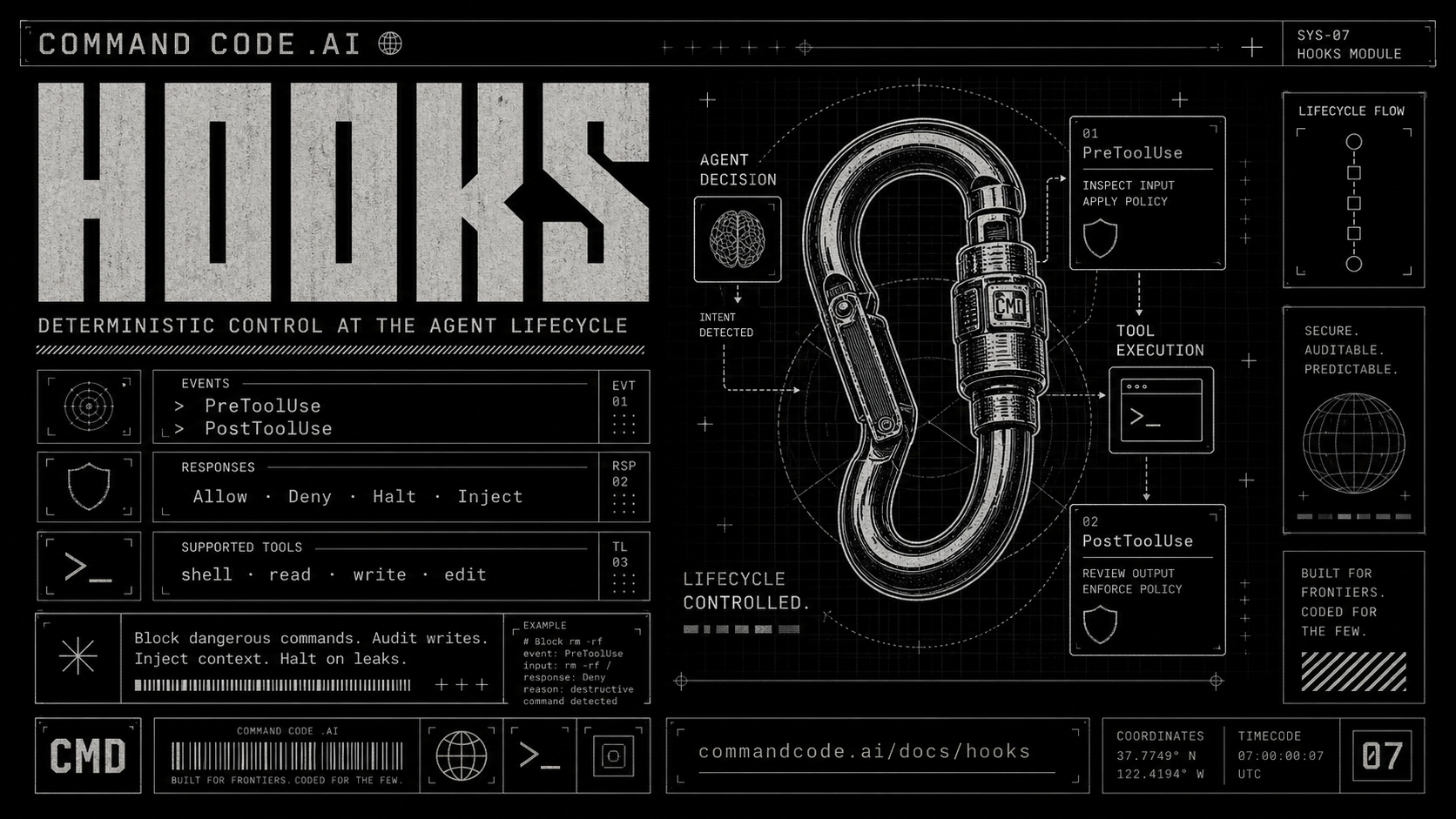
We shipped hooks today: a programmable API to the Command Code lifecycle.
AI coding agents are non-deterministic by design. The model picks a tool, a file, or an argument, and these picks are based on probabilities tuned at training time and sampled at inference time. Run the same prompt twice and you'll get two different reasonable answers. That's the feature.
It's also why the agents are hard to ship in production. A wrong rm -rf. A git push --force to the wrong branch. A DROP TABLE against the wrong database. The cost of your agent getting these wrong is measured in lost work, data, and trust. I almost rm -rf'ed a fresh clone three times last month. The rules around these have to be deterministic.
The contract problem
Three things have been used to fill the gap between "agent decides" and "deterministic rule." None of them work.
- System-prompt rules ("never run rm -rf") are not rules. They're suggestions weighted by training-time priors. A sufficiently distracted model will violate them.
- Permission prompts need a human in the loop. In any flow that batches tool calls or runs unattended, permission prompts are theatrical.
- Allow-lists are blunt. You either let
bashrun or you don't. There's no shape for bash, exceptrm -rf, except outside/tmp, except after 6pm.
What's missing is a place to run your own code, deterministically, at the one boundary that matters. Today we're launching hooks. This post is what hooks let you do, why this shape, and what to build on top of them tonight.
What we've shipped
A hook is your own program that Command Code runs at a known moment in the agent's lifecycle. It gets a JSON description of what the agent is about to do (or just did) as input, and its exit code or output decides what happens next: allow, block, or just observe.
Here's an example of what a hook does:
1$ cmd "clean up the build artifacts"
2
3⠶ I'll remove the node_modules and dist folders with rm -rf.
4
5 SHELL  [rm -rf node_modules dist]
6└ PreToolUse:SHELL blocked: rm -rf is not allowed by team policy
7
8⠶ That's blocked by your policy. Want me to use git clean -fdx instead?
That's a deterministic block. No model judgement, no permission prompt, no luck. A six-line shell script saw the command the agent was about to run, refused it, and the agent never got the chance to execute it. The model treated the block reason as a tool result it had to work around, and proposed an alternative on its own.
The hook is called PreToolUse. Its sibling, PostToolUse, fires after the tool runs, letting you observe or annotate the result the model sees on its next turn.
1LLM picks a tool
2       │
3       ▼
4   PreToolUse  ──── deny ────▶ model sees reason, retries
5       │
6      allow
7       │
8       ▼
9   tool runs
10       │
11       ▼
12   PostToolUse ──▶ model sees result (+ optional context)
These events are the two natural boundaries where an AI coding agent crosses from deciding to acting and back. Every interesting question you'd want to ask about agent behavior, what's it about to do, what just happened, was that allowed, what should the model see next, sits at one of those two seams.
Any script that can read stdin and write stdout can be used to execute a hook. Get started with the hooks overview to learn more.
Hooks you can write today
Block dangerous commands. Audit every write. Auto-format edited files. The pattern is the same: match a tool, run a script, decide what happens next.
Two patterns to drop into your settings.json are below. The full configuration format and a longer catalog of example hooks live in the docs.
A. Block rm -rf
Run a script before every shell command with the PreToolUse hook. If Command Code tries to use the rm -rf command, refuse.
1{
2  "hooks": {
3    "PreToolUse": [{
4      "matcher": "shell",
5      "hooks": [{
6        "type": "command",
7        "command": ".commandcode/hooks/guard.sh"
8      }]
9    }]
10  }
11}1#!/usr/bin/env bash
2# .commandcode/hooks/guard.sh
3
4cmd=$(jq -r '.tool_input.command') # pull the shell command out of the JSON on stdin
5if [[ "$cmd" == *"rm -rf"* ]]; then # substring match, no regex needed for one pattern
6 jq -n '{
7 hookSpecificOutput: {
8 hookEventName: "PreToolUse",
9 permissionDecision: "deny",
10 permissionDecisionReason: "rm -rf is not allowed by team policy"
11 }
12 }'
13fiB. Strip trailing whitespace
Run a one-liner after every file edit with the PostToolUse hook. command is just a shell string, so for short hooks you can skip the script file entirely.
1{
2  "hooks": {
3    "PostToolUse": [{
4      "matcher": "EDIT",
5      "hooks": [{
6        "type": "command",
7        "command": "jq -r '.tool_input.file_path' | xargs sed -i '' 's/[[:space:]]*$//'"
8      }]
9    }]
10  }
11}
jq reads the edited path from stdin, xargs hands it to sed, and trailing whitespace is stripped in place.
Hooks are a lifecycle bet, lifecycles are an ecosystem bet
Look at the pattern in software development over the ages.
-
Linux published its syscall lifecycle in the early seventies: Every system-call interception tool that exists,
strace,ptrace,seccomp,eBPF, every container runtime that does syscall filtering, sits on top of that lifecycle. -
Kubernetes published its admission-controller lifecycle: OPA Gatekeeper, Kyverno, Polaris, and a generation of policy engines were on top of it within eighteen months.
-
WordPress shipped
do_actionandapply_filters: Twenty-two years later, those two functions are the load-bearing wall under 61,000+ plugins and roughly 42% of the public web.
The pattern: Whenever infrastructure exposes its lifecycle as a stable, callable surface. An ecosystem grows on top of it within a few years.
We're making the same bet on coding agents. Hooks are designed from first principles to be that surface for Command Code.
What hooks are not
A few guardrails worth knowing before you write one. These double as our best practices.
- Hooks annotate, they don't rewrite: You can block, observe, or prepend context the model sees on the tool result. You cannot change the command, file, or args the tool actually runs against. Silently changing what the agent thinks it's doing is exactly the kind of footgun that makes "deterministic policy" become "mysterious AI behavior" again.
- Hooks don't see your secrets: Before any hook triggers, we strip every environment variable whose name matches a known credential pattern.
- Hooks aren't a permission system: Permissions ask the user. Hooks ask the policy. Different layers, kept separate so each can do its one job well.
- Hooks aren't a sandbox: Once a hook fires, it's a normal child process with full filesystem access, full network access, and whatever your shell would normally let a script do. Don't run a hook you wouldn't run by hand.
What's next
Two events ship today: PreToolUse and PostToolUse. We're working on shipping many more.
Beyond that, we're sketching type: "http" and type: "prompt" hooks. HTTP hooks let you point at a URL instead of a shell script. Prompt hooks make a single LLM call as the policy decision, useful for fuzzy decisions a regex can't make ("does this commit message look angry?").
The CLI side is also coming. cmd hooks list to show what's loaded, cmd hooks test to run a hook against synthetic input, plus a /hooks command to manage all your hooks.
I'm also working on a deeper engineering writeup on the engine that runs all this: the registry, the command adapter, the schemas, the aggregator, the trust system, the audit log. That lands soon.
Try it out
1npm i -g command-codeSign up for Command Code. Install it, run cmd, write some code, accept and reject a few suggestions. Then try to ship a hook. Let us know about your feedback. Leaving you with some useful learning resources to get started: