Thousands of developers use the Command Code CLI daily to accomplish coding tasks. Developers have been loving our CLI harness, many call it the best for Deepseek, Kimi, Qwen and other Open Source models.
However, one of the most requested additions has been API access: ability to use the Command Code plan through an API.
Command Code Provider API
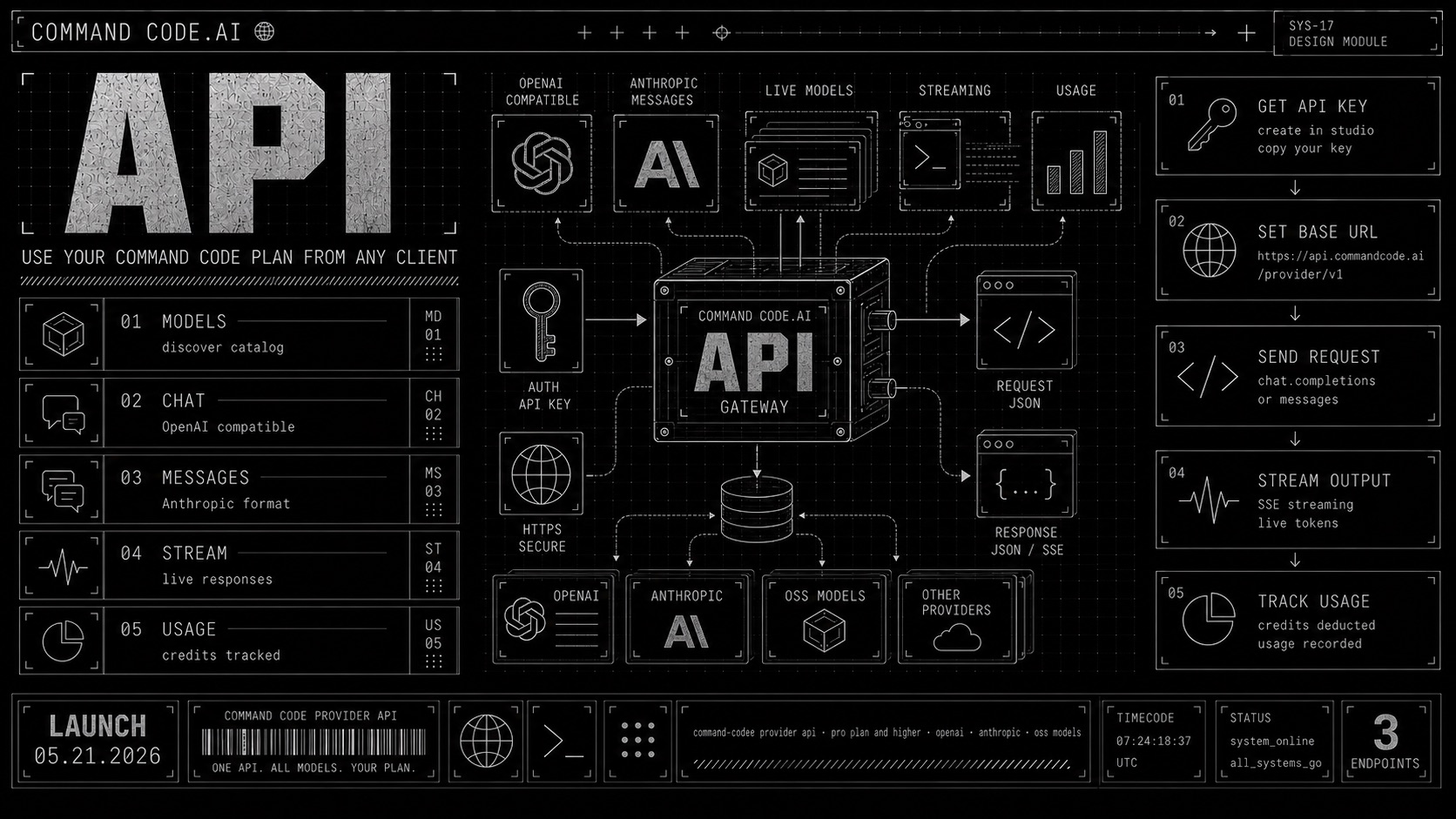
That is what we are launching with the Command Code Provider API. It lets you call Command Code models through OpenAI and Anthropic compatible endpoints.
The Provider API uses your Command Code API key, plan, credits, and usage accounting. It is available on the Pro plan or higher.
We still recommend the Command Code CLI as the best coding harness today. Read this section to decide whether you should use the CLI instead. But we understand there are use cases beyond the terminal, so the Provider API gives you direct model access when you need it.
Models
All Command Code models are available through the Provider API. Use the live models endpoint to discover the current catalog at runtime:
1curl https://api.commandcode.ai/provider/v1/modelsSee Pricing & Limits for the models and their pricing.
Each model is called through the endpoint that matches its API format:
- OpenAI and open-source models use
/provider/v1/chat/completions - Anthropic models use
/provider/v1/messages
Endpoints
| Endpoint | Method | Format |
|---|---|---|
https://api.commandcode.ai/provider/v1/chat/completions | POST | OpenAI Chat Completions |
https://api.commandcode.ai/provider/v1/messages | POST | Anthropic Messages |
https://api.commandcode.ai/provider/v1/models | GET | Models list |
Use /chat/completions for OpenAI and open-source models. Use /messages for Anthropic models. The API validates this split and returns a request error if a model is sent to the wrong endpoint.
Authentication
Create an API key in Command Code Studio, then pass it as a bearer token with each request.
OpenAI-compatible requests
The OpenAI-compatible endpoint works with the OpenAI SDK or any OpenAI-compatible client like Vercel AI SDK.
1curl https://api.commandcode.ai/provider/v1/chat/completions \
2  -H "Authorization: Bearer $CMD_API_KEY" \
3  -H "Content-Type: application/json" \
4  -d '{
5    "model": "deepseek/deepseek-v4-flash",
6    "messages": [
7      {
8        "role": "user",
9        "content": "Hello."
10      }
11    ]
12  }'
Using OpenAI SDK:
1import OpenAI from 'openai';
2
3const client = new OpenAI({
4  apiKey: process.env.CMD_API_KEY,
5  baseURL: 'https://api.commandcode.ai/provider/v1',
6});
7
8const resp = await client.chat.completions.create({
9  model: 'deepseek/deepseek-v4-flash',
10  messages: [{role: 'user', content: 'What is an API key and how to keep it safe?'}],
11});
12
13console.log(resp.choices[0].message.content);
Using Vercel AI SDK:
1import {createOpenAICompatible} from '@ai-sdk/openai-compatible';
2import {generateText} from 'ai';
3
4const cmd = createOpenAICompatible({
5  name: 'command-code',
6  apiKey: process.env.CMD_API_KEY,
7  baseURL: 'https://api.commandcode.ai/provider/v1',
8});
9
10const {text} = await generateText({
11  model: cmd('deepseek/deepseek-v4-flash'),
12  prompt: 'What is an API key and how to keep it safe?',
13});
14
15console.log(text);
Anthropic Messages requests
Anthropic models use the Anthropic Messages format.
1curl https://api.commandcode.ai/provider/v1/messages \
2  -H "Authorization: Bearer $CMD_API_KEY" \
3  -H "Content-Type: application/json" \
4  -d '{
5    "model": "claude-sonnet-4-6",
6    "max_tokens": 1024,
7    "messages": [
8      {
9        "role": "user",
10        "content": "Hi, how are you?"
11      }
12    ]
13  }'
Using Anthropic SDK:
1import Anthropic from '@anthropic-ai/sdk';
2
3const client = new Anthropic({
4  apiKey: process.env.CMD_API_KEY,
5  // The Anthropic SDK appends /v1/messages, so omit /v1 here.
6  baseURL: 'https://api.commandcode.ai/provider',
7});
8
9const resp = await client.messages.create({
10  model: 'claude-sonnet-4-6',
11  max_tokens: 1024,
12  messages: [
13    {role: 'user', content: 'Hi, how are you?'},
14  ],
15});
16
17console.log(resp.content);
Using Vercel AI SDK:
1import {createAnthropic} from '@ai-sdk/anthropic';
2import {generateText} from 'ai';
3
4const cmd = createAnthropic({
5  apiKey: process.env.CMD_API_KEY,
6  baseURL: 'https://api.commandcode.ai/provider',
7});
8
9const {text} = await generateText({
10  model: cmd('claude-sonnet-4-6'),
11  prompt: 'Hi, how are you?',
12});
13
14console.log(text);
Streaming
Streaming is supported on both routes:
1curl https://api.commandcode.ai/provider/v1/chat/completions \
2  -H "Authorization: Bearer $CMD_API_KEY" \
3  -H "Content-Type: application/json" \
4  --no-buffer \
5  -d '{
6    "model": "deepseek/deepseek-v4-flash",
7    "messages": [{"role": "user", "content": "Count to 5."}],
8    "stream": true
9 }'1curl https://api.commandcode.ai/provider/v1/messages \
2 -H "Authorization: Bearer $CMD_API_KEY" \
3 -H "Content-Type: application/json" \
4 --no-buffer \
5 -d '{
6 "model": "claude-sonnet-4-6",
7 "max_tokens": 256,
8 "messages": [{"role": "user", "content": "Count to 5."}],
9 "stream": true
10 }'Usage is emitted at the end of streamed responses. OpenAI-compatible clients receive a final usage chunk. Anthropic clients receive usage in the message_delta event.
Errors
OpenAI-compatible errors use the OpenAI error envelope:
1{
2  "error": {
3    "message": "...",
4    "type": "invalid_request_error",
5    "code": "unsupported_model",
6    "param": "model"
7  }
8}
Anthropic errors use the Anthropic error envelope:
1{
2  "type": "error",
3  "error": {
4    "type": "invalid_request_error",
5    "message": "..."
6  }
7}
Common status codes:
| Status | Meaning |
|---|---|
400 | Invalid body, unsupported model, or wrong endpoint for the model |
401 | Missing or invalid API key |
403 | Plan does not have Provider API access |
429 | Provider rate limit |
5xx | Provider service error |
When to use the Provider API
Before you jump on the API, consider whether the Command Code CLI is a better fit for your use case.
Prefer the CLI for best-in-class coding work
For efficient coding work, we still recommend the Command Code CLI over calling the Provider API directly. The CLI is not just a model transport. It includes repository context, tool execution, permissions, taste, review workflows, and model-specific behavior tuned for coding.
Furthermore, we have engineered our harness to perform exceptionally well with open-source models, which often perform worse on generic harnesses developed for closed models.
Developers have processed hundreds of billions of DeepSeek tokens through Command Code, and many call it the best harness for OSS models. We wrote more about that in How did we make DeepSeek outperform Claude Opus 4.7?.
A direct API call gives you model access, but it will miss out on the cost efficiency, quality, and coding experience Command Code provides in the terminal.
Non-interactive mode
If your use case involves automation, scripts, CI/CD, try Command Code CLI's headless mode instead of rebuilding the coding experience around the API:
1cmd -p "review this diff for breaking changes"Headless mode runs one query, writes the response to stdout, and exits. It works well in scripts, CI/CD, and automation workflows. By default, file writes, file edits, and shell commands are blocked; pass --yolo only in trusted environments when you want to allow those actions.
1cmd -p "fix the lint errors" --yoloNext steps
- Create an API key in Studio
- Read the Provider API docs for the full endpoint reference
- Check Pricing & Limits for plan access, rate limits, and model pricing
- Try the Command Code CLI for the best coding experience with Command Code models
- Read about Command Code headless mode for automation use cases